Shape Collage Maker3.61
Publisher Description
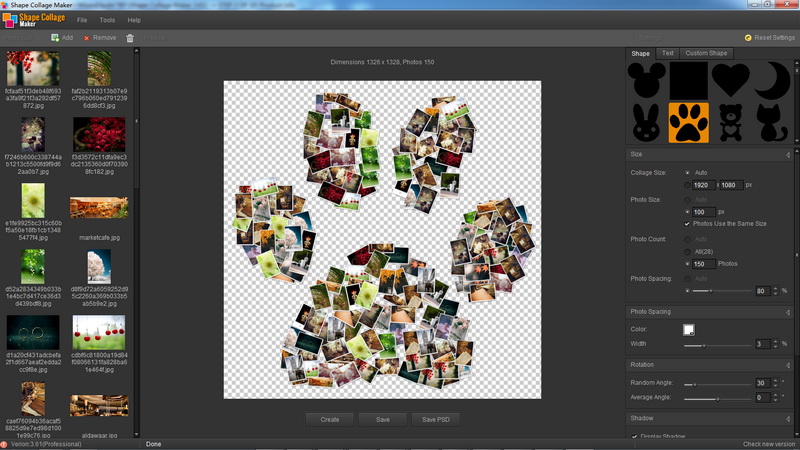
Shape Collage Maker is an automatic photo collage maker that lets you create picture collages in less than a minute with just a few mouse clicks. Shape Collage Maker creates collages using an intelligent machine learning algorithm that automatically places the photos in the collage and can arrange the photos to form different shapes. You can even save the collage as an Adobe Photoshop PSD file and edit the collage afterwards in Photoshop.
You love taking photos. You have hundreds, probably thousands on your computer, phone, and tablet. Now what? Use Shape Collage Maker to take your photos and make a beautiful and unique photo collage in any shape that you want in just seconds! Fantastic for making cards, posters, wallpapers, or even billboards.
Shape Collage Maker creates a collage by taking a bunch of photos and moving them around on a page so that they form a shape. When arranging the photos, they should be spread apart as far as possible so that you can see each one. The photos should cover the entire shape. Shape Collage Maker uses a very simple and fast machine learning algorithm to arrange the photos in the collage. It's not perfect, but it does a pretty good job. The basic idea is to throw a bunch of photos on a page and then one at a time, move each photo away from the other photos, while still staying inside of the shape. Keep doing this until the photos are evenly spaced throughout the shape.
About Shape Collage Maker
This Editors program is available in English, Armenian, Chinese, ChineseSimplified, ChineseTraditional. It was last updated on 29 September, 2026. Shape Collage Maker is compatible with the following operating systems: Windows.
The company that develops Shape Collage Maker is RainstormSoft. The latest version released by its developer is 3.61. This version was rated by 1 users of our site and has an average rating of 5.0.
The download we have available for Shape Collage Maker has a file size of 3.1 MB. Just click the green Download button above to start the downloading process. The program is listed on our website since 2014-04-08 and was downloaded 192 times. We have already checked if the download link is safe, however for your own protection we recommend that you scan the downloaded software with your antivirus. Your antivirus may detect the Shape Collage Maker as malware if the download link is broken.
How to install Shape Collage Maker on your Windows device:
- Click on the Download button on our website. This will start the download from the website of the developer.
- Once the Shape Collage Maker is downloaded click on it to start the setup process (assuming you are on a desktop computer).
- When the installation is finished you should be able to see and run the program.
Program Details
General
System requirements
Download information
Pricing
Version History
version 3.61
posted on 2014-04-08
1.Use the better UI
2.Improved core algorithm code, so that the resulting faster
3.Fixed a few minor problems
4.Conducted several improved user experience
